ChatGPT App

Your Personal Recipe Collection, Powered by AI

Save recipes from photos, websites, or text. RecipeBook organizes everything with smart categorization, nutrition estimates, and instant shopping lists — all inside ChatGPT.

Get RecipeBook Free to start · No app to install

Everything You Need to Manage Recipes

From saving a photo of grandma's handwritten card to generating a grocery list for dinner party — RecipeBook handles it all.

Save From Anywhere

Snap a photo of a cookbook page, paste a recipe URL, or type out ingredients. AI extracts and structures everything automatically.

Beautiful Recipe Library

Browse your collection in a visual grid with auto-generated categories, cuisine tags, difficulty ratings, and estimated nutrition.

Smart Recipe Scaling

Scale recipes intelligently with AI. Baking ratios, spice levels, and cook times adjust properly — not just simple multiplication.

Instant Shopping Lists

Generate shopping lists from one or more recipes. Ingredients are deduplicated and grouped by store section for efficient trips.

Share & Export

Share recipes via link, export as JSON for backup, or generate print-ready PDF recipe cards and full cookbooks.

Works Inside ChatGPT

No separate app to install or account to create. RecipeBook runs entirely within ChatGPT — just open it and start cooking.

A Beautiful Way to Manage Recipes

Clean, visual interfaces designed to make recipe management effortless.
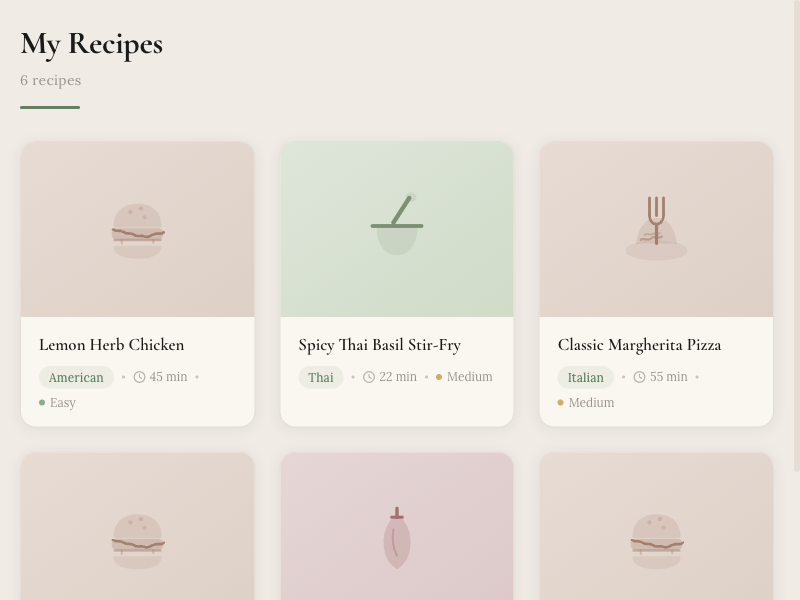
RecipeBook recipe grid showing a collection of recipe cards organized in a visual grid with cuisine tags, cook times, and difficulty ratings
Browse your collection
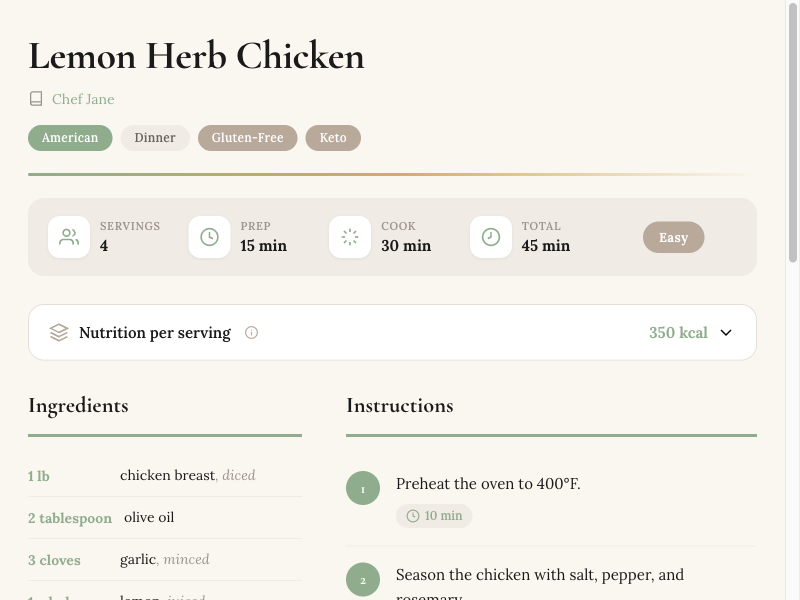
RecipeBook recipe view showing Lemon Herb Chicken with ingredients, step-by-step instructions, nutrition info, and cooking times
Full recipe details
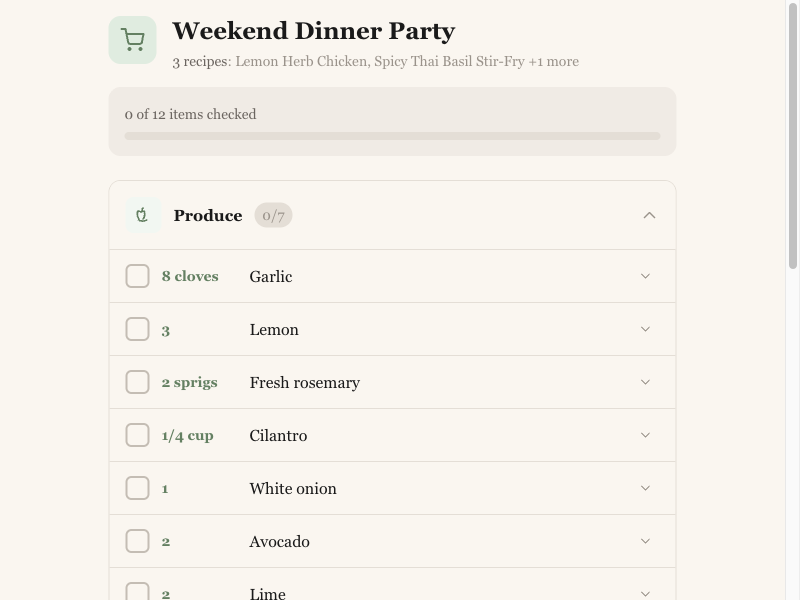
RecipeBook shopping list showing ingredients grouped by store section with checkboxes for a Weekend Dinner Party
Organized shopping lists

Common Questions

What is RecipeBook?
RecipeBook is a ChatGPT App that helps you collect, organize, and manage your recipes. It uses AI to extract recipes from photos, URLs, and text, then organizes them with automatic categorization, nutrition estimates, and a beautiful visual library.
How do I get started?
Open RecipeBook in the ChatGPT Store and start a conversation. You can save a recipe by sharing a photo, pasting a URL, typing out ingredients, or just describing a dish. RecipeBook handles the rest — extracting, formatting, and organizing everything automatically.
Is RecipeBook free?
Yes! RecipeBook offers a free tier that includes recipe creation, browsing your collection, basic scaling, and shopping lists. A premium subscription unlocks advanced features like image and URL extraction, PDF exports, and cookbook generation.
What can RecipeBook extract recipes from?
RecipeBook can extract recipes from cookbook photos, handwritten recipe cards, screenshots, website URLs, and pasted text. The AI reads and structures everything into a consistent format with ingredients, steps, times, and nutrition info.
Can I share my recipes with others?
Yes! You can generate a shareable link for any recipe. Recipients can view the recipe and optionally import it into their own RecipeBook collection. You can also export recipes as JSON or generate print-friendly PDF cards and full cookbooks.
How does smart recipe scaling work?
Unlike simple multiplication, RecipeBook uses AI to intelligently scale recipes. It adjusts baking ratios, spice levels, and cooking times appropriately — so doubling a cake recipe won't just double the leavening agent. The scaled version is shown as a preview you can save.

Start Building Your Recipe Collection

Join home cooks who use RecipeBook to save, organize, and rediscover their favorite recipes — all powered by AI, all inside ChatGPT.

Open in ChatGPT